
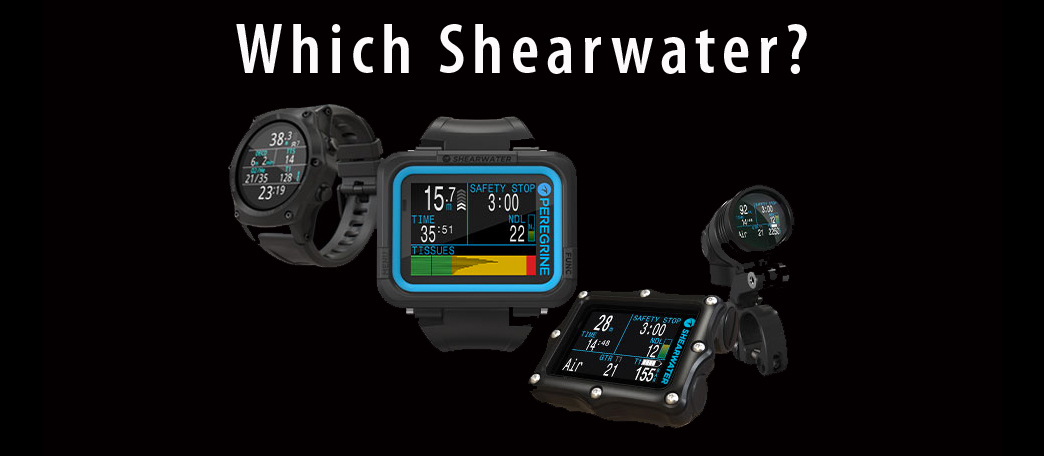
One of the challenges for a new inductee to the world of diving is staring down the barrel of the not-insignificant initial investment costs.
Let’s take it as a given that a new diver is best served to own all their own kit (we will probably write a post about that at some point). A few of these items are, perhaps, a little more expensive than someone very first learning might have thought (mask, fins); however some of these things are EXACTLY as expensive as someone might have thought (regulator, BC, computer).
In all cases and for all kit, if you are going to make an investment of hundreds or thousands of dollars, you’ll want to research a little. You’ll ask your instructor or the folks at Dive Addicts, you might visit other shops (we live in reality). You’ll search online forums and publications. You’ll want very much to make the “right” decision on something that you very much hope you will love and that you will get a lot of very happy use out of on a lot of happy dives.

For this article we’d like to focus on the dive computer. Because as opposed to a regulator (where as long as you get a mid to high-end reg… preferably an Atomic Aquatics, our personal favorite… except for a few bells and whistles, it’s pretty much going to breathe easily for decades) or a BC (where you should just get a backplate and wing and call it a day) there is a great deal of variety among computers. Given the number of brands on the market and the breakneck pace of the development of electronics, your options are wide and varied with all sorts of features which seem mind-blowingly nifty, but in reality may or may not actually be useful or worth it.
Going one further, we’re going to focus on the Shearwater Research (aka “Shearwater”) dive computer models. Not because we like to shill or advertise. Because we like the company, we like their products (hence, why we use them in our rental program). They’re robust to the point of bulletproof (did we mention we use them in our rental program?). They’re intuitive and easy to use (our SDI Open Water classes are taught using them). We’ve been diving them for more than a decade, and have had zero complaints in that time. We have dived several other brands in the past – we don’t anymore (OK. SOME of our instructors still prefer other computers)… There’s a reason.
Shearwater’s entire business is making personal dive computers and they do it exceptionally well, creating flexible computers that easily allow you to grow with the computer if you so choose and at prices that are frequently much lower than other brands which offer fewer options. What’s more, with a recent addition, they filled a minor hole in their product lineup and now offer what could arguably be a perfect computer for pretty much any diver at any level from OW 60’/20m reef diver to CCR trimix dives to the bottom of the ocean.
By contrast they do not, for example, have any model with a heart-rate monitor… because why on earth would you need that (at least until the decompression algorithms incorporate the data in a useful way)?
We are not going to list the Shearwater dive computer facts and figures and specs at you. If you want the technical details you can view the various computers, specs and comparison tables HERE. What we’re going to do is briefly touch on is which one of their line might be right for you and why.

Let’s start with what we believe to be the workhorse of the Shearwater dive computer line, the Perdix.
Out of the box you can use this computer in gauge, recreational, technical, or even CCR modes for any mixture of gasses. It comes in a gas-integrated or non-integrated model (aka works with a transmitter). It is small, simple, and adaptable with a customizable display if the stock settings don’t give you the kind of information you always want on the main screen. We say this is the workhorse because it is as flexible and far-ranging in options and information as it is.
For many years Shearwater offered only a single model at any given time and the Perdix is the final evolution (so far) of their long-time form-factor and display. In a great many ways this is the sort of device you purchase once, even as a newly certified Open Water diver, and will still be using the exact same computer a few years down the line if you are doing 4 hour long trimix rebreather dives.
In short: there isn’t much this computer can’t do.
Drawbacks:
- No option to connect directly into a rebreather for real-time PO.
- You can’t wear it around town as a watch to proudly herald yourself as a diver. Well… we mean… we guess you could. But you’d look ridiculous.
- That is the entire list of drawbacks.
In the introduction, we mentioned Shearwater’s most recent addition; it’s called the Peregrine.
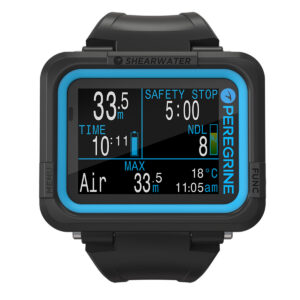
The body looks very much the same, as does the display. Only practical body differences: instead of coming out of the box with bungee loops or elastic straps the Peregrine uses a watchband style strap which will be more familiar to recreational divers (but can easily be replaced with bungee) and the buttons are actual buttons instead of the piezo switches on the rest of the Shearwater line.
The interface is, essentially, the exact same as if you had a Perdix set to recreational mode with options for air or nitrox. A gauge mode also exists and looks the exact same as its big brother.
Who is this computer for?
Do you know, beyond the shadow of doubt, that you are never, ever going to bother with that weird tech diving stuff? Then with this computer you are getting all the same features, functionality, build quality, and support that Shearwater has a reputation for, but at a fraction of the price of the rest of their line. Basically a far better computer than almost anything else on the recreational market for a fraction of even competitor prices.
There is one other demographic for whom we can squint and see a value to this gizmo. Say you DO decide to go into technical diving (or already are one of those freaks)… this can make a great bottom timer for fairly cheap.
Drawbacks
- It does what it does.
- No matter how much you might wish it would expand into CCR mode years down the line if you decide to buy a rebreather, you will be buying a new computer.
- It does not work with a transmitter.
- It does not have a digital compass.
Perhaps the objectively sexiest member of the Shearwater dive computer line is the Teric.
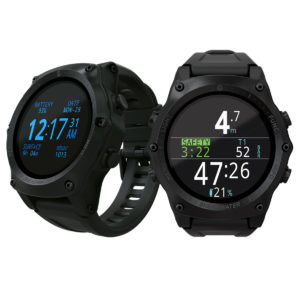
All the same capabilities and flexibility of the Perdix, but in the much smaller package of a wristwatch body.
As with the Perdix, this is suitable for OW divers and tech/CCR divers alike, as well as anyone who might suspect they may one day be on the journey from one to the other.
It’s also good for anyone who DOES want to wear their fancy dive computer around so that other divers will look and say, “Oh, word? They’ve got a Teric!” (does anyone actually still say “word”?)
Note, however, that everyone else in the world, who is not a diver, couldn’t care less.
Also, unless you’ve either got pretty big wrists and hands or are really psyched about big watches this will look a little oversized as a wristwatch. Microelectronics are powerful, but not powerful enough to pack everything that’s needed to run a fully-functional dive computer with optional gas-integration into something the size of a Cartier tank watch.
Which leads to one of the only actual drawbacks to the Teric… how are your eyes?
Unless you’ve got 20/20 vision or better, you also better have orangutan arms or a corrective mask to be able to read the display. Not that it is completely microscopic and unreadable, but it is significantly smaller than the rest of the product line.
That said, it is a sweet computer and we’d be lying if we said we didn’t want one.
Overall, those are going to be your main choices. Though there are two more models to the Shearwater dive computer line that are a little more niche.
The Petrel 2 and the NERD.
These are a couple of nifty computers which, if you need them, you’ll have a pretty good reason for it. You will also already be looking for them without needing us to tell you about them.
For those of you who are simply curious:
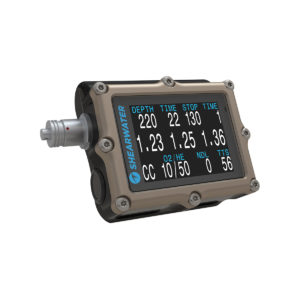
Both feature all the exact same display, functionality, and interface as the Perdix. The physical designs, obviously, are different. One’s bigger and one is smaller.
As the immediate predecessor to the Perdix, the Petrel 2 does come in a model without the Fischer connector (the metal thing off the side). With apologies to Shearwater, but if you don’t need that, we don’t know why you wouldn’t just get a Perdix. The body of the Petrel 2 is notably bigger. The screen is minutely bigger, so might help if your eyesight needs the aid? But only a very little bit.
The biggest difference is that there IS an option to have that Fischer connector there, which means you can plug the computer into many rebreathers for real-time PO2 tracking for integrated deco information.

Unless, however, you know for a fact that at some point you will be buying a rebreather and that the one you are going to get uses this feature… don’t bother. Because if you’re never plugging it into a rebreather that little end-cap is just one more thing you can lose. All for the luxury of having that thing jab you in the arm every once in a while.
The NERD 2, with its HUD (head up display) design and options for gas-integration or ability to plug into a rebreather, is cool if you absolutely need to have all of your dive information right in front of you at all times. Personally, we don’t. Burning the 2.5 calories to glance down at my arm doesn’t seem like too much of an intrusive effort to me.
So who is it for? Photographers. Videographers. People who are surveying caves. People who are exploring wrecks. People who are often in limited visibility. Working divers. People who are actively using both hands during the entire dive and don’t have the luxury of easily peeking down at their wrist to keep track of critical safety information (public safety?). If you are one of these folks then the additional cost (yes, of course there is an additional cost for a feature that groovy) will be worth it.
In the end: what Shearwater dive computer is right for you?
We don’t know, man. We don’t know each other. We don’t know what kind of diving you’re doing. Or maybe we do? Stop by and chat with us any time here at the shop, or shoot us an email, or use the nifty little facebook chat feature, here on our website. From the hip – a Perdix is probably going to be your best all-around bet. With a ton of functionality and plenty of room to grow with you at a great price, we would say that is your simplest bet.
But with some excellent features (or stripped of features so that the cost is more accessible) Shearwater has a little handful of options for any diver doing any sort of diving. And no matter which of them you choose you will be very happy with your computer.
Unless you buy something you can upload maps to. Then you’ll find that there are only like 10 maps available and they’re all of shipwrecks off Sardinia. Then you can sell that and buy a Shearwater dive computer instead.